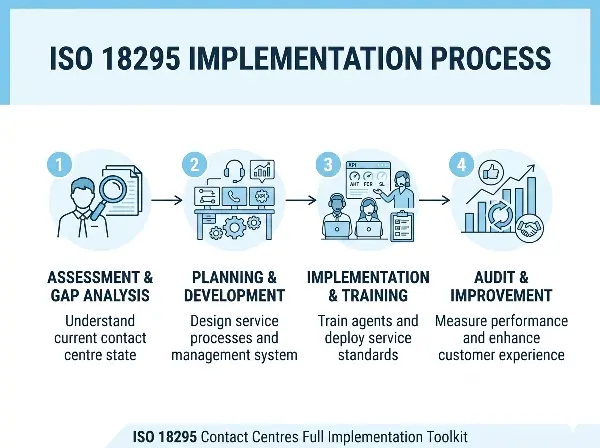
ISO 18295 - Contact Centres Full Implementation Toolkit

ISO 18295 Contact Centres Full Implementation Toolkit

The ISO 18295 Contact Centres Implementation Full Package Toolkits provide a comprehensive, ready-to-use suite of professional templates, implementation documents, and practical working tools to help organizations establish, operate, monitor, and continually improve customer contact centre processes in a structured and effective manner.

Developed in alignment with ISO 18295 best practices for customer contact centres, this toolkit converts service requirements into actionable procedures, performance controls, governance documents, and operational records that enable organizations to strengthen service quality, improve customer experience, standardize service delivery, and enhance management control with confidence and audit readiness.
Why Choose These Templates
The ISO 18295 Contact Centres Full Implementation Toolkit package includes:

- Structured folders covering the full contact centre implementation and service management lifecycle
- Professionally developed templates, procedures, forms, registers, and working documents
- Customer contact centre policy templates aligned with ISO 18295 requirements
- Service delivery procedures for inbound, outbound, multi-channel, and customer support operations
- Customer journey, service quality, and customer satisfaction management toolkits
- SLA monitoring tools, KPI dashboards, and contact centre performance scorecards
- Complaint handling, escalation control, and service recovery templates
- Workforce planning, competency, training, and agent performance evaluation documents
- Quality assurance forms, call monitoring sheets, and review checklists
- Risk, nonconformity, corrective action, and continual improvement tracking logs
- Internal audit checklists, management review templates, and evidence documentation files
- Ready-to-use Word (.docx) and Excel (.xlsx) files for immediate deployment and customization.


ISO 18295 Contact Centres Full Implementation Toolkit Implementing a professional contact centre management system aligned with ISO 18295 can be challenging and resource-intensive, particularly for organizations that need consistent service quality, structured processes, and well-documented customer interaction controls.

The ISO 18295 Contact Centres Full Implementation Toolkit provides a comprehensive set of ready-to-use templates, procedures, forms, and operational records in Word and Excel formats to help you establish service consistency, strengthen customer experience governance, standardize contact centre documentation, and accelerate implementation with greater confidence and efficiency.

 

Price: $256.00
PayPal Cards
Secure payment via PayPal. Accepted methods include PayPal and major credit cards.
✔ Instant Download  |  ✔ Secure Payment  |  ✔ No Subscription

Below is a list of documents you will find in the package. Click on index file button to see which contents are included.


Part 1. Contact Centre Governance & Service Strategy
📌Objective: To establish the governance model, service vision, operating scope, customer service commitments, leadership accountability, channel strategy, and implementation direction required to launch and control the ISO 18295 contact centre program with executive discipline.

Contact Centre Program Charter.docx
Contact Centre Governance Framework.docx
Service Strategy & Operating Model.docx
Customer Contact Scope Definition.docx
Customer Service Policy (Master).docx
Service Commitments & Objectives Definition.docx
Multichannel Service Delivery Principles.docx
Contact Centre Roles & Responsibilities.docx
Client Governance Requirements Framework.docx
ISO 18295 Implementation Roadmap.docx
Stakeholder Register.xlsx
Governance RACI Matrix.xlsx
Service Objectives & KPI Register.xlsx
Channel Scope Register.xlsx
Governance Meeting Schedule.xlsx
Program Budget Tracker.xlsx
Contact Centre Program Kickoff Slides.pptx
Executive Alignment Slides.pptx


Part 2. Customer Experience Design & Journey Management
📌Objective: To define how customer journeys, contact reasons, service expectations, accessibility, response standards, and experience design principles are translated into a consistent and measurable service model across all customer contact channels.

Customer Experience Policy.docx
Customer Journey Mapping Methodology.docx
Contact Reason Taxonomy Standard.docx
Service Accessibility & Inclusion Guidelines.docx
Omnichannel Experience Design Procedure.docx
Customer Communication Tone & Language Guide.docx
Service Level Commitment Framework.docx
Customer Journey Register.xlsx
Contact Reason Analysis Register.xlsx
Service Standards Matrix.xlsx
Channel Experience Scorecard.xlsx
Customer Pain Point Log.xlsx
Customer Journey Design Workshop Slides.pptx
Service Experience Blueprint Slides.pptx


Part 3. Contact Centre Operations Management
📌Objective: To establish the operational policies, procedures, schedules, workflow controls, escalation paths, and service execution disciplines required to run the contact centre efficiently and consistently on a day-to-day basis.

Contact Centre Operations Policy.docx
Operational Control Procedure.docx
Contact Handling Procedure.docx
Escalation Management Procedure.docx
Queue Management & Prioritization Rules.docx
Call/Email/Chat Handling Standards.docx
Business Hours & Coverage Model.docx
Daily Operations Checklist.xlsx
Shift Handover Log.xlsx
Escalation Register.xlsx
Contact Volume Tracker.xlsx
Service Disruption Log.xlsx
Operations Management Overview Slides.pptx
Team Leader Operations Slides.pptx


Part 4. Workforce Planning, Competence & Scheduling
📌Objective: To ensure the contact centre is adequately staffed, competently resourced, and operationally prepared through structured workforce planning, role profiling, training control, scheduling methods, and performance support arrangements.

Workforce Planning Policy.docx
Resource Capacity Planning Methodology.docx
Competency Framework for Contact Centre Roles.docx
Recruitment & Onboarding Procedure.docx
Training & Certification Procedure.docx
Scheduling & Adherence Management Procedure.docx
Knowledge Readiness Requirements.docx
Workforce Capacity Plan.xlsx
Competency Matrix.xlsx
Training Attendance Register.xlsx
Shift Schedule Planner.xlsx
Schedule Adherence Tracker.xlsx
Agent Certification Log.xlsx
Workforce Planning Slides.pptx
Agent Induction Slides.pptx


Part 5. Customer Interaction Handling & Service Delivery Controls
📌Objective: To standardize how customer interactions are received, authenticated, processed, resolved, documented, and followed up so that service delivery remains reliable, respectful, compliant, and aligned with defined customer expectations.

Customer Interaction Handling Policy.docx
Voice Interaction Standard.docx
Email & Written Response Standard.docx
Chat & Digital Messaging Standard.docx
Customer Verification Procedure.docx
First Contact Resolution Guidelines.docx
Vulnerable Customer Handling Procedure.docx
Interaction Quality Checklist.xlsx
Resolution Tracking Log.xlsx
Repeat Contact Analysis.xlsx
Authentication Exception Log.xlsx
Follow-Up Commitment Tracker.xlsx
Customer Handling Standards Slides.pptx
Service Excellence Coaching Slides.pptx


Part 6. Quality Monitoring, Coaching & Service Assurance
📌Objective: To define the quality assurance framework, evaluation criteria, review mechanisms, calibration methods, coaching disciplines, and service assurance records necessary to monitor and improve contact quality and service consistency.

Quality Monitoring Policy.docx
Quality Assurance Framework.docx
Interaction Evaluation Procedure.docx
Evaluator Calibration Procedure.docx
Coaching & Feedback Procedure.docx
Quality Improvement Action Protocol.docx
Quality Monitoring Scorecard.xlsx
Calibration Log.xlsx
Coaching Session Register.xlsx
Agent Quality Trend Dashboard.xlsx
Service Assurance Findings Log.xlsx
Quality Monitoring Framework Slides.pptx
Coaching for Performance Slides.pptx


Part 7. Complaint Handling & Service Recovery
📌Objective: To establish a controlled approach for receiving, classifying, investigating, resolving, escalating, and learning from complaints while protecting fairness, timeliness, transparency, and customer trust.

Complaint Handling Policy.docx
Complaint Management Procedure.docx
Complaint Classification & Severity Matrix.docx
Service Recovery Procedure.docx
Customer Redress & Resolution Guidelines.docx
Escalated Complaint Review Procedure.docx
Root Cause & Preventive Action Template.docx
Complaint Register.xlsx
Complaint Aging Tracker.xlsx
Service Recovery Log.xlsx
Complaint Root Cause Analysis.xlsx
Corrective Action Tracker.xlsx
Complaint Handling Awareness Slides.pptx
Service Recovery Leadership Slides.pptx


Part 8. Knowledge Management & Information Control
📌Objective: To ensure agents and service teams operate with accurate, current, approved, and accessible information through structured knowledge ownership, content review, version control, and information publication practices.

Knowledge Management Policy.docx
Knowledge Base Governance Procedure.docx
Content Authoring & Approval Standard.docx
Script Management & Review Procedure.docx
FAQ & Resolution Article Structure Guide.docx
Controlled Information Publication Rules.docx
Knowledge Article Register.xlsx
Script Review Log.xlsx
Knowledge Gap Tracker.xlsx
Content Approval Matrix.xlsx
Knowledge Usage Analytics.xlsx
Knowledge Management Overview Slides.pptx
Script Governance Slides.pptx


Part 9. Technology, Channel Platforms & Data Protection
📌Objective: To define the control environment for contact centre platforms, telephony, CRM, recording systems, chat tools, data protection, access rights, and service continuity enablers that support secure and dependable service delivery.

Contact Centre Technology Policy.docx
Channel Platform Control Standard.docx
Call Recording & Retention Procedure.docx
Customer Data Protection Procedure.docx
System Access & User Administration Procedure.docx
Business Continuity Requirements for CCC Platforms.docx
Screen Recording & Monitoring Notice Template.docx
Contact Centre Application Register.xlsx
Recording Retention Schedule.xlsx
Access Rights Register.xlsx
Platform Incident Log.xlsx
Channel Availability Dashboard.xlsx
Contact Centre Technology Controls Slides.pptx
Data Protection for CCC Teams Slides.pptx


Part 10. Client Management & Outsourced Contact Centre Control
📌Objective: To define the governance, contracting, oversight, reporting, and performance control arrangements needed when services are delivered for clients or when organizations rely on outsourced contact centre providers.

Client Governance Policy.docx
Outsourced Contact Centre Oversight Procedure.docx
Client Service Agreement Requirements.docx
Statement of Work Control Template.docx
Client Communication & Escalation Protocol.docx
Third-Party Performance Review Procedure.docx
Transition & Service Change Management Procedure.docx
Client Register.xlsx
Contractual Obligation Matrix.xlsx
Client SLA Tracker.xlsx
Governance Review Minutes Log.xlsx
Service Change Request Register.xlsx
Client Governance Review Slides.pptx
Outsourcing Control Overview Slides.pptx


Part 11. KPI Reporting, Performance Analytics & Management Review
📌Objective: To provide the metrics framework, dashboard structures, trend reporting, review routines, and management oversight tools required to monitor service effectiveness, operational efficiency, customer outcomes, and improvement priorities.

Performance Measurement Policy.docx
Contact Centre KPI Framework.docx
Reporting & Data Validation Procedure.docx
Management Review Procedure.docx
Customer Satisfaction Measurement Methodology.docx
Service Improvement Prioritization Rules.docx
KPI Register.xlsx
Monthly Performance Dashboard.xlsx
SLA & Response Time Tracker.xlsx
Customer Satisfaction Analysis.xlsx
Complaint Trend Report.xlsx
Action Tracking Dashboard.xlsx
Monthly KPI Review Slides.pptx
Executive Performance Review Slides.pptx


Part 12. Compliance, Internal Audit & Continual Improvement
📌Objective: To support ongoing conformity with ISO 18295 requirements through structured audit planning, evidence management, nonconformity control, corrective action tracking, service maturity review, and continual improvement governance.

ISO 18295 Compliance Policy.docx
Internal Audit Procedure.docx
Audit Report Template.docx
Nonconformity & Corrective Action Procedure.docx
Continual Improvement Framework.docx
Document & Evidence Control Procedure.docx
ISO 18295 Compliance Register.xlsx
Internal Audit Plan.xlsx
Audit Checklist.xlsx
Nonconformity Register.xlsx
Corrective Action Tracker.xlsx
Improvement Roadmap.xlsx
Document Version Control Register.xlsx
ISO 18295 Internal Audit Slides.pptx
Continual Improvement Review Slides.pptx


Download index file Payment guide

Date File Updated 25/03/2025
File Format pdf, xls, doc
No. of files 172 Files, 12 Folders
File download size 4.50 MB (.rar)
Language English
Purchase code ISO18295-Toolkits
This document has been certified by a professional
100% customizable. You can edit our templates as needed.
Instant download after completing your order. Our download process takes less than 2 minutes.
We recommend downloading this file onto your computer.
Your payment information is processed securely.
After payment, if you require an invoice, please email us.
Support contact: supports@standard-toolkits.org


Elevate your contact centre performance with confidence - The complete ISO 18295 toolkit!
A premium all-in-one resource set to design, implement, control, and continually improve customer contact centre operations in alignment with ISO 18295 service excellence requirements.
FAQs

1. Who are these toolkits designed for?

The toolkits available on standard-toolkits.org are specifically designed for professionals, managers, and leaders in the fields of information technology and digital transformation, including but not limited to:

  • CIO (Chief Information Officer)

  • CTO (Chief Technology Officer)

  • CISO (Chief Information Security Officer)

  • CAIO (Chief AI Officer)

  • CDO (Chief Digital Officer)

  • IT Managers, Governance Officers, and Compliance Specialists

  • IT auditors, risk management professionals, cybersecurity teams

  • Digital transformation consultants and ISO/COBIT/ITIL implementation specialists

  • Corporate trainers and lecturers delivering internal workshops or professional training programs

These toolkits are suitable for:

  • Large enterprises operating complex IT systems or aligning with international frameworks

  • Small and medium-sized enterprises (SMEs) building standardized IT governance and digital systems

  • Training institutions, research organizations, and independent consultants in need of ready-to-use, structured implementation tools

2. What does each toolkit include?

Each toolkit on standard-toolkits.org is built with a comprehensive, practical, and structured framework tailored to real-world enterprise usage. Depending on the theme (CIO, CTO, CISO, CAIO, Digital Transformation, ISO 27001, etc.), a typical toolkit includes:

🔹 1. Management Templates (Word files)

  • Dozens to hundreds of editable templates: policies, procedures, plans, checklists, reports

  • Organized by topic for easy navigation

  • Fully customizable to fit your organization's needs

🔹 2. Analytical & Governance Spreadsheets (Excel files)

  • KPI dashboards, risk matrices, budget planning sheets, scoring models

  • Equipped with formulas, charts, and dynamic tables for automated calculations

🔹 3. Professional Presentation Slides (PowerPoint files)

  • Ready-to-use slides for internal communication, training, or executive briefings

  • Professionally designed and brand-customizable

🔹 4. User Guides & Application Notes

  • Detailed instructions explaining the purpose and use case of each document

  • Guidance on how to adapt the materials based on industry and organizational structure

3. How many templates/documents are included in each toolkit?

The number of documents varies by toolkit, but most are developed as comprehensive, in-depth packages tailored to different roles and objectives:

Functional Role-Based Toolkits (CIO, CTO, CISO, CAIO, etc.):

  • 80-150 Word templates organized into 8-15 modules

  • 30-50 Excel dashboards, analysis sheets, financial models

  • 20-40 PowerPoint presentations for strategy, training, or communication

International Standards Toolkits (ISO 27001, COBIT, ITIL, GDPR...):

  • 100-200 standardized documents mapped to clauses or control objectives

  • Templates linked directly to audit/compliance requirements

Digital Transformation & AI Toolkits:

  • 70-120 specialized templates for assessing readiness, planning AI initiatives, managing risk, and tracking performance

4. Can I preview the content before purchasing?

Yes. We understand that reviewing content before purchase is important for informed decision-making. Therefore, on each toolkit's product page, we provide:

  • Sample screenshots of templates, dashboards, or slides

  • Full list of included files with module names and file IDs

  • For selected toolkits, free downloadable samples or sample previews upon request

If you require a preview of specific documents or modules before purchasing, feel free to contact us via email or the website form. Our support team will respond promptly with tailored assistance.

5. Are these toolkits suitable for small and medium-sized businesses (SMEs)?

Absolutely. The toolkits are built with flexibility and scalability, making them suitable not only for large enterprises but also for SMEs that are:

  • Building foundational IT governance systems

  • Standardizing cybersecurity and compliance processes

  • Launching digital transformation or AI adoption initiatives

  • Seeking practical, ready-to-use materials without large consulting budgets

Key benefits for SMEs:

  • Easy-to-use templates that can be selectively applied

  • No complex systems required - just Word, Excel, and PowerPoint

  • Significant cost and time savings compared to hiring consultants

  • Step-by-step guidance to empower internal IT and leadership teams

6. What file formats are used in the toolkits? (Word, Excel, PowerPoint?)

All documents are provided in fully editable, standard office formats, compatible with widely used software such as Microsoft Office and Google Workspace.

Supported file types:

  • Microsoft Word (.docx):
    For policies, procedures, forms, SOPs, audit reports, etc.
    → Easy to edit, insert content, and tailor to your organizational structure.

  • Microsoft Excel (.xlsx):
    For dashboards, risk matrices, financial models, analytics, and scoring sheets
    → Built-in formulas, charts, and conditional formatting included.

  • Microsoft PowerPoint (.pptx):
    For strategy presentations, internal training, communication slides
    → Professionally designed and ready for brand customization.

7. Are the templates editable?

Yes. All templates are 100% editable.

They are delivered in original, editable formats (Word, Excel, PowerPoint), giving users full flexibility to:

  •  Customize the content to meet specific business needs (e.g., add/remove fields, modify titles, internal references)

  •  Insert company logo, brand elements, and internal policies

  •  Adjust layouts, colors, and languages to fit your organization's tone and culture

  •  Apply across departments, projects, or branches with full flexibility

8. Are toolkit contents regularly updated? What is the update policy?

Yes. We regularly update all toolkits to keep pace with evolving technologies, regulatory changes, and updates to global standards (e.g., ISO, COBIT, ITIL, NIST).

🔄 Update policy:

  • All customers are notified by email when new updates are released

  • Minor updates (e.g., error corrections, improved instructions, minor enhancements) are free within 6-12 months of purchase (depending on the product)

  • Major updates (e.g., alignment with new versions of ISO/COBIT, content restructuring, additional modules) will be offered to previous customers at exclusive upgrade discounts

📌 Recommendation:
Keep your order confirmation email and reference ID to easily access update privileges in the future.

🎯 Our commitment is to ensure customers always have access to modern, comprehensive, and field-tested tools to support successful implementation.

9. Can I use the templates immediately, or do I need to adjust them first?

You can start using them right away. All templates are designed based on international best practices and are structured for immediate deployment.

Key features:

  • Built with real-world content and standard-compliant structures

  • Come with usage instructions and practical context

  • Organized by thematic modules for step-by-step or full-system deployment

However, to maximize relevance, we recommend:

  • ✏️ Adjusting certain fields (e.g., company name, department, KPIs, policies)

  • ✏️ Localizing formatting and language if needed for training or board-level presentations

🎯 With their professional design and ready-to-use content, the toolkits help you reduce 60-80% of documentation time while ensuring consistency and quality in execution.

10. Do toolkits come with user guides or instructions?

Yes. Every toolkit includes a comprehensive set of user guides to help you implement effectively - even without prior consulting experience.

Guides typically include:

  • Toolkit overview: Use cases, target users, structure, and application areas

  • How to use each document type: Purpose, real-life use cases, and rollout steps

  • Customization guidance: How to adapt the templates for your business size, industry, or internal policies

  • Workflow diagrams (if applicable): Showing logical connections among templates

  • Recommended implementation sequence: Step-by-step instructions for deploying by topic or by phase

🎯 Our goal is not just to provide professional templates, but to ensure you know how to apply them effectively - with or without external consultants.

11. Are templates within one toolkit duplicated across other toolkits?

No, contents are not duplicated. Each toolkit on standard-toolkits.org is purpose-built for a specific role or governance function, ensuring no overlap between toolkits.

How we ensure content uniqueness:

  • Each toolkit is centered around a unique role or theme, such as CIO, CTO, CISO, CAIO, Digital Transformation, ISO 27001, etc.

  • Every template is written with specific use cases, responsibilities, and workflows of that role in mind.

  • The structure, fields, and metrics in each file are tailored to distinct business needs.

Example:
A "Technology Strategy Roadmap" in the CTO Toolkit is completely different from a "Digital Transformation Strategy" in the Digital Transformation Toolkit or an "AI Strategy Plan" in the CAIO Toolkit.

🎯 This role-based structure enables users to combine multiple toolkits without content redundancy, creating a comprehensive enterprise management system.

12. Can I purchase only specific parts or individual sections of a toolkit?

By default, our toolkits are offered as complete, full-featured packages to ensure:

  • Logical consistency and completeness across the full implementation process

  • A holistic view of the management or compliance framework

  • Avoiding gaps or missing critical templates by purchasing only partial content

🔄 However, in special cases, we can support:

  • Providing individual modules or sections (e.g., only the Risk Management section or only the Technology Strategy module)

  • Helping you select a tailored bundle based on your short-term needs

📩 Please contact our support team via email or the contact form for a custom quote or to request a sample preview before making a decision.

13. What payment methods are accepted?

We support multiple secure and globally accepted payment methods to accommodate customers worldwide.

Accepted payment options include:

  • Credit/Debit Cards:
    Visa, Mastercard, American Express, JCB, and other major cards

  • PayPal:
    A secure and fast method for both individuals and businesses

  • Stripe:
    Built-in checkout on our website, allowing direct card payments securely

  • Bank Transfer (upon request):
    For custom or bulk orders, we can provide manual bank transfer instructions as needed

🎯 Once payment is completed, you will automatically receive a confirmation email and secure download link within 15-60 minutes. If support is required, our team is available to assist promptly.

14. How will I receive the toolkit after payment?

As soon as your payment is successfully completed, the system will automatically redirect you to a secure download page where you can immediately download the full toolkit package.

✅ No need to wait for an email - the download page appears instantly after checkout.
✅ All files will be provided in a single ZIP archive or through a secure cloud-hosted link.

📌 Important Note:
Please ensure that your browser does not block redirects after payment. If for any reason you are not redirected to the download page, kindly contact us at supports@standard-toolkits.org - we will provide an alternative download link promptly.

🎯 This instant delivery method ensures you receive the toolkit quickly and securely, without delay.

15. Can I request an invoice or official billing document?

Yes. We can issue official invoices (electronic tax invoices) upon request for companies, organizations, or individuals who need to declare business expenses.

How to request an invoice:

  1. After completing payment, send an email to:
    📩 supports@standard-toolkits.org

  2. Include the following details:

    • Company/organization name

    • Tax identification number (if applicable)

    • Billing address

    • Email to receive the invoice

    • Special notes (if any)

    • Order reference number or payment confirmation

  3. Processing time:

    • Invoices are issued via email within 2-3 business days after we receive complete information.

📌 Invoices are issued by the official legal entity representing standard-toolkits.org and comply with tax and financial regulations applicable to international businesses.

16. Can I get support if I have trouble using the templates?

Yes. We are committed to supporting our customers before, during, and after toolkit implementation.

Types of support available:

  • Email support:
    Send questions to 📩 supports@standard-toolkits.org - we will reply within 24 business hours to help with usage, customization, or deployment.

  • Implementation guidance:
    We provide process flowcharts, usage notes, and recommendations to help users understand how to apply each group of templates.

  • Customization advisory:
    If your organization has unique industry or structural needs, our team of experts can suggest how to tailor templates accordingly.

  • Related materials recommendation:
    If the current toolkit doesn't fully meet your requirements, we can recommend complementary documents from our other toolkits.

🎯 Our mission goes beyond delivering templates - we aim to help you apply them effectively, achieve real results, and drive organizational value.

17. Who can I contact for advanced or specialized support?

If you need expert-level support for using, customizing, or implementing our toolkits in your organization, our team of consultants is ready to assist.

Official support channels:

🛠 Specialized support may include:

  • Advisory on deploying toolkit components based on your roadmap

  • Template customization for specific industries (banking, manufacturing, logistics, public sector, etc.)

  • Full-scale implementation support for ISO certification, IT governance programs, digital transformation, or AI deployment

🎯 We're not just a content provider - we are a trusted partner in helping you deliver successful execution and lasting impact.

18. What if a file doesn't work or I have trouble opening it?

All files are thoroughly tested before release to ensure compatibility with major office software. However, in rare cases, users may encounter issues. Here's how to resolve them:

Common issues and solutions:

  • File won't open or shows a format error:
    → Use Microsoft Office 2016+ or Google Workspace
    → Ensure the file was properly extracted if downloaded as a .zip

  • Excel files show macro or content warnings:
    → Click "Enable Editing" and "Enable Content" to activate features

  • Missing files or extraction issues:
    → Check your internet connection and re-download the file
    → Contact us if the issue persists - we'll provide a new download link

📩 If you face any technical error, please email supports@standard-toolkits.org with a brief description and a screenshot (if available).
👉 We are committed to resolving all technical issues within 24 business hours.


Related ISO Toolkits For Consultants

Related ISO Toolkits for Consultants provide ready-to-use templates, checklists, registers, reports, and implementation documents that help consultants deliver ISO projects faster, more consistently, and with greater confidence.

These toolkits support key consulting activities such as gap assessment, documentation development, control implementation, audit readiness, and continual improvement across a wide range of ISO standards.


Newsletter Subcribe

Updates information of IT management tools every week, please provide your email address in the box below, and have oppotunity to download 25 toolkits free.


ISO Toolkits
Comments
  • The IT Toolkit has truly revolutionized our IT operations. It's the foundation of our SOPs, helps generate run books, reduces training costs, and boosts user satisfaction.

  • After implementing the IT Toolkit, we now have a well-organized IT plan that's professional and easy for everyone to access and use.

  • Our clients have responded positively. Even those who had information, found ours better organized, making us more efficient and improving our IT management.

  • The toolkit offers a framework for best practices, ensuring that as practices evolve, our documentation system adapts seamlessly.

  • The IT Toolkit brings structure to documentation management, reducing the workload on engineers so they can focus more on clients. It's a game changer.

  • The IT Toolkit prevents duplicate entries and has replaced two other tools, making it much more effective and faster. Our engineers love it!

  • The IT Toolkit is incredibly easy to use with no ramp-up time. It's a straightforward process that gives clients control while simplifying their workflow.

  • The IT Toolkit has given me a better understanding of IT management efficiency and provides an easy, friendly way to improve our processes.

  • The toolkit has helped me organize my thoughts and training strategies with our IT team, making everything more streamlined.

  • Excellent IT Toolkit! It's essential for all CIOs and technology managers looking to enhance their operations.

  • A very useful toolkit, one of the best I've used. I wish every IT manager could benefit from it.

  • These toolkits have boosted my confidence and empowered me to grow as an IT Manager.


Discover why ISO Consultants and Compliance Leaders choose Standard-Toolkits for faster implementation, stronger governance!